


Bath & Body Works
4.232.68K Reviews
App Specs
- Version
- 13.1.0
- Updated On
- License
- Free
- Downloads
- 10,000,000+
- Developer
- Bath & Body Works- Mobile
- Categories
- Shopping
- Platform
- Android, iOS
Screenshots
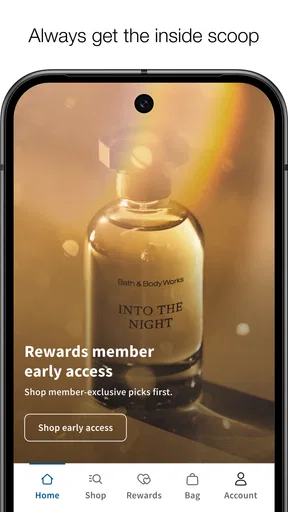
 Analysis by AppCompare
I judge a shopping app by how comfortably I can use it when I have a real errand to finish, not just when I have time to browse. Bath & Body Works is built around a particular kind of shopping: choosing scented products, keeping track of things I might want later, and making it easier to connect online browsing with a visit to a store. That focus makes it useful for regular customers, though it is less compelling if you are only looking for a general-purpose place to compare many brands.
Readability and finding your way around
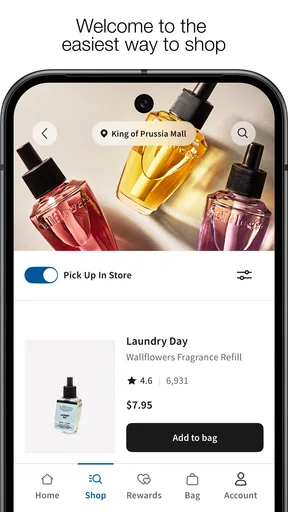
The first question I have with any store app is whether I can get to a product without fighting through a maze of promotions. Here, the shopping layout and recognizable product categories give me a straightforward starting point. If I know the kind of item I want, I can use search; if I am still deciding, browsing categories is a more natural route. That difference matters: searching is efficient for a familiar product, while browsing gives me room to compare scents and formats before committing.
Product names and fragrance descriptions do much of the work that scent itself would do in a physical shop. I treat those descriptions as useful clues rather than a perfect substitute for smelling something in person. When I am choosing a gift or trying an unfamiliar fragrance, I would rather use the app to narrow the options and then decide whether an in-store visit makes more sense.
The app is free, and Bath & Body Works- Mobile is its developer. Its store profile shows an average rating of 4.3 from around 289,000 ratings, alongside roughly 32,000 written reviews and over 10 million installs. It is rated for everyone, which makes it broadly suitable as a shopping tool, but that rating does not tell me whether every screen or shopping step will feel comfortable for every person.
Motor and sensory considerations
On a phone, a simpler route through browsing can reduce unnecessary tapping, especially when I already know what I need. I would use search for a repeat purchase, then check the product details before adding it to my shopping plans. For a less certain purchase, I would browse at my own pace instead of trying to make a quick decision from a busy display of seasonal choices.
There is a trade-off built into shopping for fragrance remotely: visual descriptions can help organize choices, but they cannot reproduce scent. That can be a sensory limitation for anyone who relies on smelling a product before buying it, and it is also relevant if strong fragrances are uncomfortable. I would not treat a product image or a suggested match as evidence that a scent will suit me; when that matters, an in-person visit is the more dependable option.
Using it around everyday plans
The app’s store locator is useful when I want to turn browsing into a practical trip. I can look for a nearby location, check its hours, and get directions, which is especially helpful when I am away from my usual area. I would check those details before setting out rather than assuming a store visit will fit neatly between other errands.
Worth Reading Before You Choose

EA SPORTS FC Mobile 26 Is a Bigger Football Game, but It Takes Time

Flipboard Shows What News Apps Must Do Beyond the Feed

Switching to Android Auto Means Rethinking Your Driving Routine

Google Calendar Makes a Crowded Week Easier to Manage

Ludo King Makes the Most of the Minutes Between Plans

Baby Panda World Brings Quick Play to Modern Phones, but Its Game Library Feels Busy
A wishlist is handy for another common situation: spotting a product while browsing but not being ready to buy it. Saving the idea gives me somewhere to return instead of relying on memory. It can also make gift planning less rushed, since I can gather a few possibilities and compare them later. The useful habit is to treat a saved item as a shortlist, not as a final decision; the scent and the occasion still need thought.
The app comes from the shopping category, and its current version is 10.1.2, with iOS support beginning at version 12. I would consider it most useful for someone who already buys from the brand, wants to keep product ideas together, or regularly needs to find a nearby store. If I were just comparing home, body, or fragrance products across many different retailers, I would start with a broader shopping app instead.
Where the convenience has limits
Recommendations and offers can make browsing feel more personal, but I would still check the details rather than assume a suggestion is exactly what I want. Shopping apps are designed to bring products and promotions into view; that can save time when I am interested, yet it can also make a quick check turn into a longer browse. Going in with a specific item or budget in mind helps me stay focused.
Access also depends on the situation. A phone can be easier than a store visit when I am planning from home, but browsing while walking, riding in a car, or juggling bags is not a good substitute for a calm shopping session. Small text, busy product imagery, or a need for precise taps can make any mobile storefront tiring for some people. I would pause, enlarge the display settings if helpful, and finish a purchase when I can give the screen my attention.
For someone who prefers to make every decision by touch and smell, or who does not want shopping suggestions and seasonal displays, this app may not add much. A store visit offers direct sensory judgement; a general retailer can be better for comparing competing brands in one place. The right choice depends on whether brand-specific browsing and store-finding are worth having together on a phone.
How I would make the app work for me
In an everyday scenario, I might remember that I need a familiar item while planning the rest of my week. I would search for it at home, use the product information to confirm I have the right one, and save anything I am not ready to decide on. If I want to buy in person, I can check the locator and plan the trip around the store’s hours. That small sequence—search, verify, save or visit—makes more sense to me than casually scrolling and hoping I remember what caught my eye.
Practical choices for different shoppers
For repeat customers, one useful approach is to separate known purchases from experiments. Search for the familiar product first, then browse new arrivals only if you have time. For a gift, I would save several possibilities before choosing, especially when I do not know the recipient’s scent preferences. That keeps the app useful as a planning tool without pretending it can resolve a personal fragrance choice on its own.
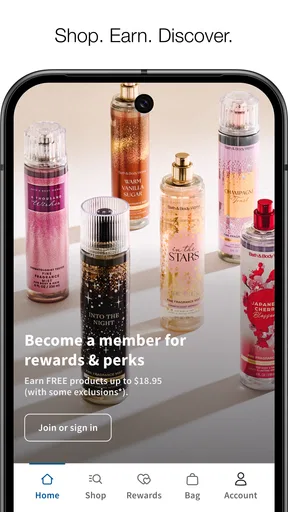
The app’s “Shop. Earn. Redeem. Repeat!” positioning points toward a recurring shopping relationship, rather than a one-off comparison marketplace. That is a meaningful distinction from the usual alternative: a large general retailer may make cross-brand comparison easier, while this app keeps attention on Bath & Body Works products and shopping. If I mainly want that brand, the focused experience is an advantage. If I want to compare prices, ingredients, or fragrances across unrelated brands, I would use other sources alongside it rather than expect this app to do everything.
Offers can be a reason to check the app before a planned purchase, but I would not let a promotion decide what I buy. My practical rule is to start with the product I actually need, then see whether an offer is relevant. That reduces the chance of adding something simply because it appeared while I was browsing. The same approach helps keep recommendations useful: treat them as prompts to inspect, not as instructions to follow.
Making mobile shopping more comfortable
Different abilities and circumstances call for different ways of shopping. If reading a screen is tiring, I would use the phone’s own display and text-size controls where available, then browse in a well-lit, stationary setting. If repeated tapping is difficult, starting with a specific search and keeping the task short may be less demanding than exploring several sections. These are practical adjustments, not a claim that the app has a particular accessibility certification or a specialized mode.
Sensory needs also change what counts as convenient. The app can help me identify and organize products, but fragrance remains difficult to judge remotely. Someone sensitive to scents may prefer to avoid exploratory browsing and use the app only for products they already know; another person may find an in-store visit too stimulating and prefer a short, planned online session. Neither approach is universally better. I would choose the one that gives me enough information without making the shopping process uncomfortable.
There are also times when neither a phone screen nor a store visit is ideal: perhaps I am in a hurry, have limited connectivity, or need help with an unfamiliar product. I would avoid starting a complicated order in the middle of another task. A focused session at home is more likely to let me read descriptions carefully and decide whether I need to ask someone, visit a store, or choose a product I already recognize.
My inclusive verdict
My overall view is that Bath & Body Works is most helpful as a brand-specific companion for browsing, saving ideas, and planning a store visit. It is not a replacement for experiencing fragrance in person, nor is it the best starting point for shoppers who want a broad, side-by-side comparison across retailers. Its strengths become clearer when I know what kind of product I want and can use the app at a comfortable pace.
For a regular customer, the combination of product discovery, recommendations, offers, a wishlist, and store-finding can make routine shopping easier to organize. For a first-time shopper, I would use those tools to build a shortlist and then decide whether descriptions are enough or whether I want to visit a store. For someone who finds mobile shopping difficult, I would keep the task narrow and use the phone’s general accessibility settings where useful, while recognizing that no screen setting can reproduce a scent or remove every barrier.
So I would recommend giving it a try if Bath & Body Works is already part of your shopping routine and you value having brand browsing and store planning in one place. I would skip it if you rarely shop the brand, need to compare a wide range of retailers, or depend on smelling products before making any choice. The app is at its best when it supports a decision I have already begun to make—not when it is expected to make that decision for me.
Have you ever walked into a Bath & Body Works store and been mesmerized by the amazing scents? Well, now they’ve bottled up that experience into an app, and I’ve taken it for a spin. Let me tell you, this is one app that’s as delightful as the products themselves!
First Impressions
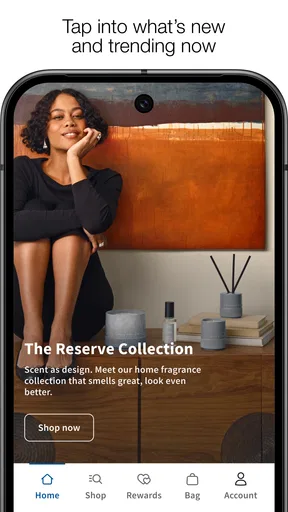
First off, downloading the app was a breeze. Once installed, I was greeted with a clean, intuitive interface that made navigating a piece of cake. If you’re like me and get overwhelmed by cluttered screens, you’ll appreciate the simplicity here. Everything is neatly organized, and the vibrant colors immediately remind you of their signature packaging.
Features Worth Noting
One of the highlights for me is the personalized offers and recommendations. The app seems to know exactly what I want before I do. After making a few purchases, it started suggesting products that were right up my alley. It’s like having a personal shopper at your fingertips!
Another cool feature is the store locator. Whether you’re at home or traveling, finding a nearby store is super easy. You can even check store hours and get directions, which is a huge plus if you’re in a new city.
I also loved the wishlist feature. I often find myself making mental notes of products I want to try but then forget about them later. With the app, I can just pop them onto my wishlist and revisit them whenever I’m ready to shop.
User Experience
Navigating through the app is as smooth as butter. The categories are clearly marked, and the search function is robust. Whether you’re looking for a specific scent or a particular type of product, you can find it in no time. Plus, the app is pretty fast, so no annoying lag or freezing to deal with.
And for those who love staying on top of the latest trends, the app regularly updates with new arrivals and seasonal collections. You’ll never miss a launch or special event again!
Final Thoughts
In a nutshell, the app is a must-have for anyone who loves their products. It’s user-friendly, packed with features, and brings the delightful world of scents right to your phone. Whether you’re a long-time fan or a newbie to the brand, this app enhances the shopping experience in a big way.
So, if you haven’t already, give it a download and dive into a world of fragrances and fabulousness. Trust me, your nose will thank you!
Pros
- Wide variety of fragrances available.
- User-friendly interface and navigation.
- Regular discounts and promotions.
- Detailed product descriptions.
- Easy wishlist and cart features.
Cons
- Limited international shipping options.
- App occasionally crashes on older devices.
- Notifications can be overwhelming.
- Some items frequently out of stock.
- Requires account for full access.
FAQs for Bath & Body Works
What features does the Bath & Body Works app offer?
The Bath & Body Works app provides a seamless shopping experience with features like exclusive offers, a product catalog, and the ability to track orders. Users can also manage their rewards, receive personalized recommendations, and find nearby store locations. It’s designed to enhance your shopping journey with convenience and personalization.
Is the Bath & Body Works app free to download and use?
Yes, the Bath & Body Works app is free to download from both the Google Play Store and the Apple App Store. While the app itself is free, purchasing products through the app will require payment. Users can also enjoy access to exclusive deals and promotions available only to app users.
Can I use the app to track my Bath & Body Works rewards?
Absolutely! The Bath & Body Works app allows you to easily manage and track your rewards. By logging into your account, you can view your rewards status, see how close you are to earning your next reward, and access exclusive member offers. It’s a convenient way to keep tabs on your benefits.
What kind of customer support is available through the app?
The Bath & Body Works app includes a customer support section where users can access frequently asked questions, contact customer service via email or phone, and find quick solutions to common issues. The app aims to provide an efficient support experience, ensuring your queries are addressed promptly.
How does the app handle user privacy and data security?
The Bath & Body Works app prioritizes user privacy and data security by implementing robust measures to protect your information. The app uses encryption and secure servers to safeguard your data. Additionally, users can manage their privacy settings within the app, ensuring transparency and control over personal information.


